openpose を試す
openpose を試しましょう。
インストール
openpose/installation.md at master · CMU-Perceptual-Computing-Lab/openpose · GitHub
依存
いろいろありますが、構築が面倒な CUDA 8 と cuDNN 5.1 が、私の環境では、ちょうど
$ nvcc --version
nvcc: NVIDIA (R) Cuda compiler driver
Copyright (c) 2005-2016 NVIDIA Corporation
Built on Tue_Jan_10_13:22:03_CST_2017
Cuda compilation tools, release 8.0, V8.0.61

$ ls /usr/local/cuda/lib64/libcudnn.so.*
/usr/local/cuda/lib64/libcudnn.so.5  /usr/local/cuda/lib64/libcudnn.so.5.1.10
ということで、満たしておりました。
その他も、 apt-get からインストールできました。
コマンドラインからコンパイル
openpose/installation.md at master · CMU-Perceptual-Computing-Lab/openpose · GitHub
テスト
まずは、サンプルを使いましょう。
処理が軽そうな画像を。
~/openpose$ ./build/examples/openpose/openpose.bin --image_dir examples/media/
Starting pose estimation demo.
Auto-detecting all available GPUs... Detected 1 GPU(s), using 1 of them starting at GPU 0.
Starting thread(s)
Real-time pose estimation demo successfully finished. Total time: 9.159081 seconds.
HDF5: infinite loop closing library
      D,T,F,FD,P,FD,P,FD,P,E,E,E,E,E,E,E,E,E,E,E,E,E,E,E,E,E,E,E,E,E,E,E,E,E,E,E,E,E,E,E,E,E,E,E,E,E,E,E,E,E,E,E,E,E,E,E,E,E,E,E,E,E,E,E,E,E,E,E,E,E,E,E,E,E,E,E,E,E,E,E,E,E,E,E,E,E,E,E,E,E,E,E,E,E,E,E,E,E,E,E,E,E,E,E,E
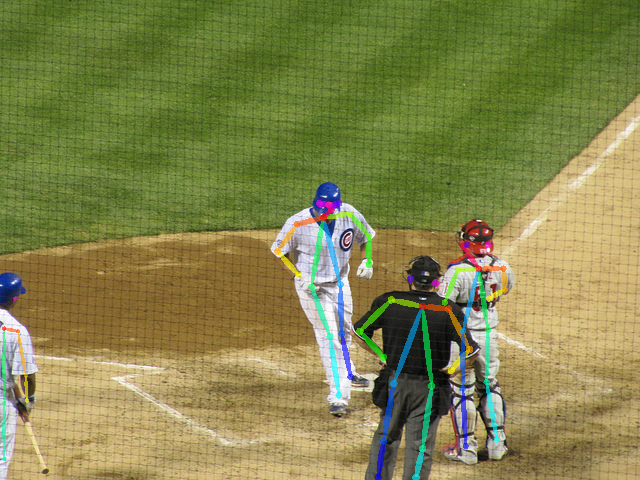
加工後の画像が表示されて、消えていきます。
オプションの確認
$ ./openpose/build/examples/openpose/openpose.bin --help
openpose.bin: Warning: SetUsageMessage() never called

  Flags from /home/kiyo/openpose/examples/openpose/openpose.cpp:
    -3d (Running OpenPose 3-D reconstruction demo: 1) Reading from a stereo
      camera system. 2) Performing 3-D reconstruction from the multiple views.
      3) Displaying 3-D reconstruction results. Note that it will only display
      1 person. If multiple people is present, it will fail.) type: bool
      default: false
    -3d_min_views (Minimum number of views required to reconstruct each
      keypoint. By default (-1), it will require all the cameras to see the
      keypoint in order to reconstruct it.) type: int32 default: -1
    -3d_views (Complementary option to `--image_dir` or `--video`. OpenPose
      will read as many images per iteration, allowing tasks such as stereo
      camera processing (`--3d`). Note that `--camera_parameters_folder` must
      be set. OpenPose must find as many `xml` files in the parameter folder as
      this number indicates.) type: int32 default: 1
    -alpha_heatmap (Blending factor (range 0-1) between heatmap and original
      frame. 1 will only show the heatmap, 0 will only show the frame. Only
      valid for GPU rendering.) type: double default: 0.69999999999999996
    -alpha_pose (Blending factor (range 0-1) for the body part rendering. 1
      will show it completely, 0 will hide it. Only valid for GPU rendering.)
      type: double default: 0.59999999999999998
    -body_disable (Disable body keypoint detection. Option only possible for
      faster (but less accurate) face keypoint detection.) type: bool
      default: false
    -camera (The camera index for cv::VideoCapture. Integer in the range [0,
      9]. Select a negative number (by default), to auto-detect and open the
      first available camera.) type: int32 default: -1
    -camera_fps (Frame rate for the webcam (also used when saving video). Set
      this value to the minimum value between the OpenPose displayed speed and
      the webcam real frame rate.) type: double default: 30
    -camera_parameter_folder (String with the folder where the camera
      parameters are located.) type: string
      default: "models/cameraParameters/flir/"
    -camera_resolution (Set the camera resolution (either `--camera` or
      `--flir_camera`). `-1x-1` will use the default 1280x720 for `--camera`,
      or the maximum flir camera resolution available for `--flir_camera`)
      type: string default: "-1x-1"
    -disable_blending (If enabled, it will render the results (keypoint
      skeletons or heatmaps) on a black background, instead of being rendered
      into the original image. Related: `part_to_show`, `alpha_pose`, and
      `alpha_pose`.) type: bool default: false
    -disable_multi_thread (It would slightly reduce the frame rate in order to
      highly reduce the lag. Mainly useful for 1) Cases where it is needed a
      low latency (e.g. webcam in real-time scenarios with low-range GPU
      devices); and 2) Debugging OpenPose when it is crashing to locate the
      error.) type: bool default: false
    -display (Display mode: -1 for automatic selection; 0 for no display
      (useful if there is no X server and/or to slightly speed up the
      processing if visual output is not required); 2 for 2-D display; 3 for
      3-D display (if `--3d` enabled); and 1 for both 2-D and 3-D display.)
      type: int32 default: -1
    -face (Enables face keypoint detection. It will share some parameters from
      the body pose, e.g. `model_folder`. Note that this will considerable slow
      down the performance and increse the required GPU memory. In addition,
      the greater number of people on the image, the slower OpenPose will be.)
      type: bool default: false
    -face_alpha_heatmap (Analogous to `alpha_heatmap` but applied to face.)
      type: double default: 0.69999999999999996
    -face_alpha_pose (Analogous to `alpha_pose` but applied to face.)
      type: double default: 0.59999999999999998
    -face_net_resolution (Multiples of 16 and squared. Analogous to
      `net_resolution` but applied to the face keypoint detector. 320x320
      usually works fine while giving a substantial speed up when multiple
      faces on the image.) type: string default: "368x368"
    -face_render (Analogous to `render_pose` but applied to the face. Extra
      option: -1 to use the same configuration that `render_pose` is using.)
      type: int32 default: -1
    -face_render_threshold (Analogous to `render_threshold`, but applied to the
      face keypoints.) type: double default: 0.40000000000000002
    -flir_camera (Whether to use FLIR (Point-Grey) stereo camera.) type: bool
      default: false
    -frame_first (Start on desired frame number. Indexes are 0-based, i.e. the
      first frame has index 0.) type: uint64 default: 0
    -frame_flip (Flip/mirror each frame (e.g. for real time webcam
      demonstrations).) type: bool default: false
    -frame_last (Finish on desired frame number. Select -1 to disable. Indexes
      are 0-based, e.g. if set to 10, it will process 11 frames (0-10).)
      type: uint64 default: 18446744073709551615
    -frame_rotate (Rotate each frame, 4 possible values: 0, 90, 180, 270.)
      type: int32 default: 0
    -frames_repeat (Repeat frames when finished.) type: bool default: false
    -fullscreen (Run in full-screen mode (press f during runtime to toggle).)
      type: bool default: false
    -hand (Enables hand keypoint detection. It will share some parameters from
      the body pose, e.g. `model_folder`. Analogously to `--face`, it will also
      slow down the performance, increase the required GPU memory and its speed
      depends on the number of people.) type: bool default: false
    -hand_alpha_heatmap (Analogous to `alpha_heatmap` but applied to hand.)
      type: double default: 0.69999999999999996
    -hand_alpha_pose (Analogous to `alpha_pose` but applied to hand.)
      type: double default: 0.59999999999999998
    -hand_net_resolution (Multiples of 16 and squared. Analogous to
      `net_resolution` but applied to the hand keypoint detector.) type: string
      default: "368x368"
    -hand_render (Analogous to `render_pose` but applied to the hand. Extra
      option: -1 to use the same configuration that `render_pose` is using.)
      type: int32 default: -1
    -hand_render_threshold (Analogous to `render_threshold`, but applied to the
      hand keypoints.) type: double default: 0.20000000000000001
    -hand_scale_number (Analogous to `scale_number` but applied to the hand
      keypoint detector. Our best results were found with `hand_scale_number` =
      6 and `hand_scale_range` = 0.4.) type: int32 default: 1
    -hand_scale_range (Analogous purpose than `scale_gap` but applied to the
      hand keypoint detector. Total range between smallest and biggest scale.
      The scales will be centered in ratio 1. E.g. if scaleRange = 0.4 and
      scalesNumber = 2, then there will be 2 scales, 0.8 and 1.2.) type: double
      default: 0.40000000000000002
    -hand_tracking (Adding hand tracking might improve hand keypoints detection
      for webcam (if the frame rate is high enough, i.e. >7 FPS per GPU) and
      video. This is not person ID tracking, it simply looks for hands in
      positions at which hands were located in previous frames, but it does not
      guarantee the same person ID among frames.) type: bool default: false
    -heatmaps_add_PAFs (Same functionality as `add_heatmaps_parts`, but adding
      the PAFs.) type: bool default: false
    -heatmaps_add_bkg (Same functionality as `add_heatmaps_parts`, but adding
      the heatmap corresponding to background.) type: bool default: false
    -heatmaps_add_parts (If true, it will fill op::Datum::poseHeatMaps array
      with the body part heatmaps, and analogously face & hand heatmaps to
      op::Datum::faceHeatMaps & op::Datum::handHeatMaps. If more than one
      `add_heatmaps_X` flag is enabled, it will place then in sequential memory
      order: body parts + bkg + PAFs. It will follow the order on
      POSE_BODY_PART_MAPPING in `src/openpose/pose/poseParameters.cpp`. Program
      speed will considerably decrease. Not required for OpenPose, enable it
      only if you intend to explicitly use this information later.) type: bool
      default: false
    -heatmaps_scale (Set 0 to scale op::Datum::poseHeatMaps in the range
      [-1,1], 1 for [0,1]; 2 for integer rounded [0,255]; and 3 for no
      scaling.) type: int32 default: 2
    -identification (Whether to enable people identification across frames. Not
      available yet, coming soon.) type: bool default: false
    -image_dir (Process a directory of images. Use `examples/media/` for our
      default example folder with 20 images. Read all standard formats (jpg,
      png, bmp, etc.).) type: string default: ""
    -ip_camera (String with the IP camera URL. It supports protocols like RTSP
      and HTTP.) type: string default: ""
    -keypoint_scale (Scaling of the (x,y) coordinates of the final pose data
      array, i.e. the scale of the (x,y) coordinates that will be saved with
      the `write_keypoint` & `write_keypoint_json` flags. Select `0` to scale
      it to the original source resolution, `1`to scale it to the net output
      size (set with `net_resolution`), `2` to scale it to the final output
      size (set with `resolution`), `3` to scale it in the range [0,1], and 4
      for range [-1,1]. Non related with `scale_number` and `scale_gap`.)
      type: int32 default: 0
    -logging_level (The logging level. Integer in the range [0, 255]. 0 will
      output any log() message, while 255 will not output any. Current OpenPose
      library messages are in the range 0-4: 1 for low priority messages and 4
      for important ones.) type: int32 default: 3
    -model_folder (Folder path (absolute or relative) where the models (pose,
      face, ...) are located.) type: string default: "models/"
    -model_pose (Model to be used. E.g. `COCO` (18 keypoints), `MPI` (15
      keypoints, ~10% faster), `MPI_4_layers` (15 keypoints, even faster but
      less accurate).) type: string default: "COCO"
    -net_resolution (Multiples of 16. If it is increased, the accuracy
      potentially increases. If it is decreased, the speed increases. For
      maximum speed-accuracy balance, it should keep the closest aspect ratio
      possible to the images or videos to be processed. Using `-1` in any of
      the dimensions, OP will choose the optimal aspect ratio depending on the
      user's input value. E.g. the default `-1x368` is equivalent to `656x368`
      in 16:9 resolutions, e.g. full HD (1980x1080) and HD (1280x720)
      resolutions.) type: string default: "-1x368"
    -no_gui_verbose (Do not write text on output images on GUI (e.g. number of
      current frame and people). It does not affect the pose rendering.)
      type: bool default: false
    -num_gpu (The number of GPU devices to use. If negative, it will use all
      the available GPUs in your machine.) type: int32 default: -1
    -num_gpu_start (GPU device start number.) type: int32 default: 0
    -number_people_max (This parameter will limit the maximum number of people
      detected, by keeping the people with top scores. The score is based in
      person area over the image, body part score, as well as joint score
      (between each pair of connected body parts). Useful if you know the exact
      number of people in the scene, so it can remove false positives (if all
      the people have been detected. However, it might also include false
      negatives by removing very small or highly occluded people. -1 will keep
      them all.) type: int32 default: -1
    -output_resolution (The image resolution (display and output). Use "-1x-1"
      to force the program to use the input image resolution.) type: string
      default: "-1x-1"
    -part_candidates (Also enable `write_json` in order to save this
      information. If true, it will fill the op::Datum::poseCandidates array
      with the body part candidates. Candidates refer to all the detected body
      parts, before being assembled into people. Note that the number of
      candidates is equal or higher than the number of final body parts (i.e.
      after being assembled into people). The empty body parts are filled with
      0s. Program speed will slightly decrease. Not required for OpenPose,
      enable it only if you intend to explicitly use this information.)
      type: bool default: false
    -part_to_show (Prediction channel to visualize (default: 0). 0 for all the
      body parts, 1-18 for each body part heat map, 19 for the background heat
      map, 20 for all the body part heat maps together, 21 for all the PAFs,
      22-40 for each body part pair PAF.) type: int32 default: 0
    -process_real_time (Enable to keep the original source frame rate (e.g. for
      video). If the processing time is too long, it will skip frames. If it is
      too fast, it will slow it down.) type: bool default: false
    -profile_speed (If PROFILER_ENABLED was set in CMake or Makefile.config
      files, OpenPose will show some runtime statistics at this frame number.)
      type: int32 default: 1000
    -render_pose (Set to 0 for no rendering, 1 for CPU rendering (slightly
      faster), and 2 for GPU rendering (slower but greater functionality, e.g.
      `alpha_X` flags). If -1, it will pick CPU if CPU_ONLY is enabled, or GPU
      if CUDA is enabled. If rendering is enabled, it will render both
      `outputData` and `cvOutputData` with the original image and desired body
      part to be shown (i.e. keypoints, heat maps or PAFs).) type: int32
      default: -1
    -render_threshold (Only estimated keypoints whose score confidences are
      higher than this threshold will be rendered. Generally, a high threshold
      (> 0.5) will only render very clear body parts; while small thresholds
      (~0.1) will also output guessed and occluded keypoints, but also more
      false positives (i.e. wrong detections).) type: double
      default: 0.050000000000000003
    -scale_gap (Scale gap between scales. No effect unless scale_number > 1.
      Initial scale is always 1. If you want to change the initial scale, you
      actually want to multiply the `net_resolution` by your desired initial
      scale.) type: double default: 0.29999999999999999
    -scale_number (Number of scales to average.) type: int32 default: 1
    -video (Use a video file instead of the camera. Use
      `examples/media/video.avi` for our default example video.) type: string
      default: ""
    -write_coco_json (Full file path to write people pose data with JSON COCO
      validation format.) type: string default: ""
    -write_heatmaps (Directory to write body pose heatmaps in PNG format. At
      least 1 `add_heatmaps_X` flag must be enabled.) type: string default: ""
    -write_heatmaps_format (File extension and format for `write_heatmaps`,
      analogous to `write_images_format`. For lossless compression, recommended
      `png` for integer `heatmaps_scale` and `float` for floating values.)
      type: string default: "png"
    -write_images (Directory to write rendered frames in `write_images_format`
      image format.) type: string default: ""
    -write_images_format (File extension and format for `write_images`, e.g.
      png, jpg or bmp. Check the OpenCV function cv::imwrite for all compatible
      extensions.) type: string default: "png"
    -write_json (Directory to write OpenPose output in JSON format. It includes
      body, hand, and face pose keypoints (2-D and 3-D), as well as pose
      candidates (if `--part_candidates` enabled).) type: string default: ""
    -write_keypoint ((Deprecated, use `write_json`) Directory to write the
      people pose keypoint data. Set format with `write_keypoint_format`.)
      type: string default: ""
    -write_keypoint_format ((Deprecated, use `write_json`) File extension and
      format for `write_keypoint`: json, xml, yaml & yml. Json not available
      for OpenCV < 3.0, use `write_keypoint_json` instead.) type: string
      default: "yml"
    -write_keypoint_json ((Deprecated, use `write_json`) Directory to write
      people pose data in JSON format, compatible with any OpenCV version.)
      type: string default: ""
    -write_video (Full file path to write rendered frames in motion JPEG video
      format. It might fail if the final path does not finish in `.avi`. It
      internally uses cv::VideoWriter.) type: string default: ""


  Flags from src/gflags.cc:
    -flagfile (load flags from file) type: string default: ""
    -fromenv (set flags from the environment [use 'export FLAGS_flag1=value'])
      type: string default: ""
    -tryfromenv (set flags from the environment if present) type: string
      default: ""
    -undefok (comma-separated list of flag names that it is okay to specify on
      the command line even if the program does not define a flag with that
      name.  IMPORTANT: flags in this list that have arguments MUST use the
      flag=value format) type: string default: ""

  Flags from src/gflags_completions.cc:
    -tab_completion_columns (Number of columns to use in output for tab
      completion) type: int32 default: 80
    -tab_completion_word (If non-empty, HandleCommandLineCompletions() will
      hijack the process and attempt to do bash-style command line flag
      completion on this value.) type: string default: ""

  Flags from src/gflags_reporting.cc:
    -help (show help on all flags [tip: all flags can have two dashes])
      type: bool default: false currently: true
    -helpfull (show help on all flags -- same as -help) type: bool
      default: false
    -helpmatch (show help on modules whose name contains the specified substr)
      type: string default: ""
    -helpon (show help on the modules named by this flag value) type: string
      default: ""
    -helppackage (show help on all modules in the main package) type: bool
      default: false
    -helpshort (show help on only the main module for this program) type: bool
      default: false
    -helpxml (produce an xml version of help) type: bool default: false
    -version (show version and build info and exit) type: bool default: false

  Flags from src/logging.cc:
    -alsologtoemail (log messages go to these email addresses in addition to
      logfiles) type: string default: ""
    -alsologtostderr (log messages go to stderr in addition to logfiles)
      type: bool default: false
    -colorlogtostderr (color messages logged to stderr (if supported by
      terminal)) type: bool default: false
    -drop_log_memory (Drop in-memory buffers of log contents. Logs can grow
      very quickly and they are rarely read before they need to be evicted from
      memory. Instead, drop them from memory as soon as they are flushed to
      disk.) type: bool default: true
    -log_backtrace_at (Emit a backtrace when logging at file:linenum.)
      type: string default: ""
    -log_dir (If specified, logfiles are written into this directory instead of
      the default logging directory.) type: string default: ""
    -log_link (Put additional links to the log files in this directory)
      type: string default: ""
    -log_prefix (Prepend the log prefix to the start of each log line)
      type: bool default: true
    -logbuflevel (Buffer log messages logged at this level or lower (-1 means
      don't buffer; 0 means buffer INFO only; ...)) type: int32 default: 0
    -logbufsecs (Buffer log messages for at most this many seconds) type: int32
      default: 30
    -logemaillevel (Email log messages logged at this level or higher (0 means
      email all; 3 means email FATAL only; ...)) type: int32 default: 999
    -logmailer (Mailer used to send logging email) type: string
      default: "/bin/mail"
    -logtostderr (log messages go to stderr instead of logfiles) type: bool
      default: false
    -max_log_size (approx. maximum log file size (in MB). A value of 0 will be
      silently overridden to 1.) type: int32 default: 1800
    -minloglevel (Messages logged at a lower level than this don't actually get
      logged anywhere) type: int32 default: 0
    -stderrthreshold (log messages at or above this level are copied to stderr
      in addition to logfiles.  This flag obsoletes --alsologtostderr.)
      type: int32 default: 2
    -stop_logging_if_full_disk (Stop attempting to log to disk if the disk is
      full.) type: bool default: false

  Flags from src/utilities.cc:
    -symbolize_stacktrace (Symbolize the stack trace in the tombstone)
      type: bool default: true

  Flags from src/vlog_is_on.cc:
    -v (Show all VLOG(m) messages for m <= this. Overridable by --vmodule.)
      type: int32 default: 0
    -vmodule (per-module verbose level. Argument is a comma-separated list of
      <module name>=<log level>. <module name> is a glob pattern, matched
      against the filename base (that is, name ignoring .cc/.h./-inl.h). <log
      level> overrides any value given by --v.) type: string default:
オプションを指定して、保存しましょう。
/openpose$ ./build/examples/openpose/openpose.bin --image_dir examples/media/ -write_images write_images -write_images_format png
これで、 write_images ディレクトリに、加工済みの画像が保存されます。